
Modivcare
ModivcareMedical
4.511.13K Reviews
- Version
- 1.5.16
- Installs
- 500.00K
- Age Rating
- Everyone
Screenshots

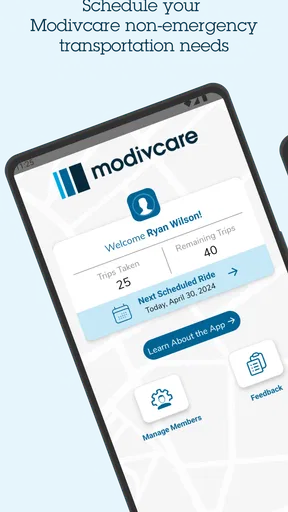
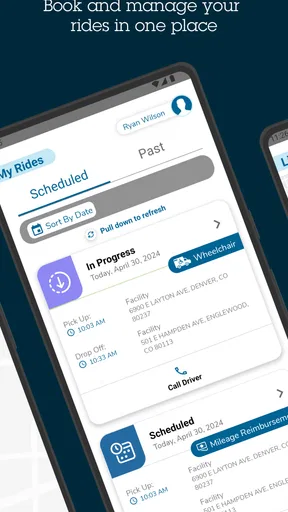
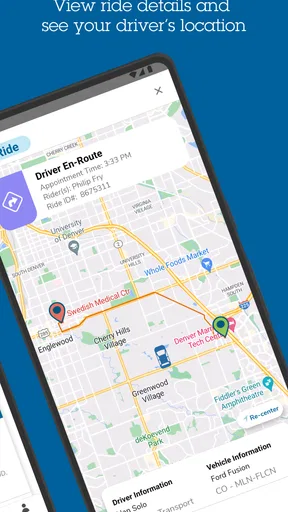
Our Review of Modivcare
 Analysis by Appyee
Getting to a medical appointment can be stressful before the journey even begins, especially when transportation has to be arranged through a benefit or care program. Modivcare is built for that specific problem: it lets Modivcare members book and manage trips from a phone. I found its value less in flashy extras and more in putting a task that often involves calls, waiting, and repeated explanations into one mobile workflow.
This is a medical app from Modivcare, offered free of charge and rated for Everyone. Its average score is 4.6 from around 29 thousand ratings, with more than 500 thousand installs, so it has clearly reached a substantial number of people who depend on transportation coordination. I would not treat those figures as a guarantee that every trip will be smooth, but they do suggest that the app is familiar to many members.
What the app is really useful for
The central benefit is straightforward: members can arrange transportation and keep track of trip-related details without relying entirely on a phone conversation. That matters when an appointment is early, recurring, or difficult to reschedule. Instead of searching through unrelated travel apps, I can think of Modivcare as a member portal focused on the medical journey itself.
That distinction is important. This is not a general ride-hailing service, a route planner, or a replacement for emergency transportation. Its usefulness depends on being a Modivcare member and using the transportation service connected to that membership. Someone looking for a spontaneous ride across town, a public-transit map, or a way to compare ordinary taxi prices should choose a different kind of app.
For a scheduled medical visit, though, the focused design makes sense. The relevant question is not “Which ride is cheapest right now?” but “How do I arrange and manage the trip connected to my care?” Keeping that purpose in mind prevents disappointment and makes the app easier to judge fairly.
Booking from a realistic daily situation
Imagine a member who has a clinic appointment next week and normally has to remember the appointment time, transportation details, and any return-trip arrangements separately. Using the app, that person can begin the booking process from a mobile device rather than waiting until office hours to call. The practical advantage is not merely speed. It is the chance to handle the request while the appointment information is still in front of them, then return to the app later to manage the trip.
I especially see value for recurring care. A person attending physical therapy, dialysis, specialist visits, or regular checkups may have many similar journeys to organize. A dedicated medical transportation app can reduce the mental burden of remembering which trip has already been arranged. It also gives the member a single place to revisit instead of scattering notes across text messages, paper reminders, and call histories.
My advice is to enter details slowly, particularly the appointment date, pickup information, and destination. A transportation request is not the place to rush through a form while distracted. Before finishing, I would review every visible detail and keep the appointment information nearby. The app can organize a request, but it cannot correct a mistaken address or an incorrect appointment time caused by hurried entry.
Why connectivity changes the experience
Because booking and managing a trip involve current account and transportation information, the app is most useful when the phone has a dependable connection. A weak signal can turn a simple task into an uncertain one: a screen may take longer to load, a submission may need another attempt, or the user may be unsure whether the latest change went through.
I would therefore avoid leaving a first-time booking until the moment I am standing outside a clinic. A better habit is to arrange the trip in a place with reliable Wi-Fi or mobile data, then open the app again before leaving to check the current information. That two-stage routine is more sensible than assuming the phone will work perfectly in a basement, parking garage, elevator, or rural area.
The same issue applies to trip management. When the app is used to review or adjust an existing journey, the information is only as reassuring as the latest successful connection. I would not rely on a screen that has been left open for hours without refreshing it. If the trip is important, I would check it close enough to departure that I can still contact the appropriate support channel if something looks wrong.
Using it in mobile and difficult environments
Medical transportation often intersects with places where phones are awkward to use. A member may be leaving a hospital, waiting in a crowded lobby, carrying a bag, or helping another person. Modivcare’s mobile format is useful in those moments because the task can be handled from a phone rather than requiring access to a computer. Still, portability does not remove the need for attention.
I would prepare the important information before opening the app: the appointment time, the pickup location, the destination, and any details needed to identify the member’s trip. This reduces the chance of switching between several apps or papers while the connection is unstable. It also makes the booking process less tiring for someone who is already dealing with a medical appointment.
There is a trade-off here. A mobile app is more convenient than a desktop-only portal when a person is away from home, but a small screen can make it easier to overlook a line of information. If vision, dexterity, or concentration is a concern, I would use the phone in a quiet place and enlarge the device’s text if needed. For a caregiver arranging transportation for somebody else, I would double-check whose member account is active before submitting anything.
What to do when something goes wrong
The most important practical limitation is that an app cannot solve every transportation problem by itself. A request may need clarification, a trip may require attention from the transportation program, or a connection may fail during an important step. I would not interpret a frozen screen or a missing update as proof that a trip has been canceled, nor would I repeatedly submit the same request without checking whether the first attempt was accepted.
A cautious recovery routine helps. First, I would wait briefly and see whether the screen completes. Next, I would reopen the relevant area and look for the current trip information. If the app still does not provide a clear result, I would record what I already entered and use the established Modivcare support route rather than creating duplicate bookings. The goal is to preserve a clear record of what happened.
That approach is particularly important for return transportation. A medical visit can run late, and a member may be tired or unable to spend a long time troubleshooting outside the facility. I would review the return arrangements before the appointment begins, while I still have time and a stable connection. If the schedule changes, I would update the trip as early as possible instead of waiting until the last few minutes.
Connectivity can fail for ordinary reasons: a crowded network, poor indoor reception, a low-data situation, or a phone that has not been restarted in a long time. None of those problems is unique to this app, but they matter more when the task concerns healthcare transportation. Keeping the phone charged and carrying the relevant appointment details separately is simple preparation, not unnecessary pessimism.
Using mobile data without wasting it
Modivcare is not the sort of app I would expect to consume data like a video service, but a data-conscious user should still avoid unnecessary repeated loading. I would use Wi-Fi for the initial booking when it is convenient, then reserve mobile data for checking the trip while away from home. This is especially sensible for people with limited data plans or unreliable reception.
I would also avoid repeatedly closing and reopening the app just to see whether something has changed. One careful check is more useful than many anxious refreshes. If a page appears incomplete, I would first confirm that the phone has a connection and that the app is responding before trying again. Repeated submissions can create confusion, while a deliberate review keeps the trip history easier to understand.
Another useful habit is to take note of the information needed for the journey without assuming that a screenshot or old screen is the final authority. A saved image can help with memory, but current trip details may change. I would use any saved note as a backup reference and verify the live information when the connection is available. That balances convenience with the risk of relying on stale details.
How it compares with calling or using general ride apps
The usual alternative is a phone call. Calling can be better when a member has a complicated situation, needs personal clarification, or cannot comfortably navigate a small screen. A human representative may be more helpful than an app when the request involves unusual circumstances. On the other hand, the app is preferable when the task is routine and the member wants to initiate or manage it without waiting on hold.
General ride-hailing apps serve a different purpose. They are often designed for immediate private rides, visible vehicle matching, and price-based decisions. Modivcare is more appropriate when the member’s transportation is tied to the Modivcare program and a medical appointment. Comparing the two as if they were identical can lead to the wrong choice: one is a benefit-connected medical transportation tool, while the other is a consumer travel marketplace.
A desktop website may be more comfortable for a caregiver who handles several details at once, but the phone app has the advantage when the member is already traveling or waiting at a facility. I would choose the app for access and trip management on the move, a call for complicated or urgent clarification, and a general ride service only when it is actually suitable for the member’s coverage and situation.
Who will benefit most from it
Modivcare is a strong fit for members who regularly arrange covered medical transportation and prefer handling routine tasks from a phone. It is also useful for family members or caregivers who help organize appointments, provided they have the correct access and are careful about entering the right member and trip information.
People who dislike phone queues may appreciate the ability to begin the process digitally. Members with recurring appointments may gain the most because a consistent workflow is easier to repeat than rebuilding the same explanation during every call. The app also suits users who want to check trip information while away from a computer.
I would be more cautious about recommending it as the only plan for someone with very limited smartphone experience, unreliable connectivity, or a transportation request that needs detailed human discussion. Those users may still benefit from the app for simple checks, but a phone-based support option could be more comfortable when accuracy matters more than convenience.
Version, access, and long-term practicality
The current version is 1.5.16 and requires Android 7.0 or later. That makes device compatibility worth checking before installation, particularly for anyone using an older phone. Since the app is free, the main practical costs are not a purchase price but the time needed to learn the workflow and the connectivity required to use account-based functions reliably.
Its Everyone age rating also reflects that the app is intended for broad access rather than a narrowly restricted audience. In practice, the important question is less about age and more about whether the user is an eligible Modivcare member or is assisting one. A person outside that system may install the app and still find that it does not solve their transportation needs.
For privacy and safety, I would use the app on a personal or trusted device, keep the phone’s lock screen enabled, and avoid entering member information while connected to an unfamiliar public network when a safer option is available. Those are sensible precautions for any medical account. I would also update the app through the normal device store when updates are offered, since transportation details and account access deserve a maintained application.
My connectivity verdict
After looking at how it fits into real travel situations, I see Modivcare as a focused tool rather than a complete transportation safety net. Its best quality is that it gives members a mobile way to book and manage medical trips, which can be much less tiring than repeating routine requests by phone. The experience is strongest when the user plans ahead, has a stable connection, and treats the app as one part of the transportation process rather than the only source of backup.
The limits are equally clear. It is not designed for ordinary ride-hailing, it may be inconvenient for users who need extensive personal assistance, and connectivity problems can create uncertainty at exactly the wrong time. I would not wait until pickup is imminent to learn the app, and I would keep appointment details and a support plan available for important journeys.
My recommendation is positive for Modivcare members who want convenient mobile control over routine medical transportation. I would install it if I regularly needed to arrange or review these trips, especially for recurring care. I would choose a call or another appropriate service when the situation is complicated, urgent, or outside the Modivcare program. Used with that realistic understanding, Modivcare is a practical medical app that can make transportation planning feel more organized without pretending that a phone screen can replace every human or network-dependent step.
Privacy and Permissions
See what permissions an app requests and how it handles your data.
- Location
- approximate location (network-based), precise location (GPS and network-based)
- Photos/Media/Files
- read the contents of your USB storage, modify or delete the contents of your USB storage
- Storage
- read the contents of your USB storage, modify or delete the contents of your USB storage
- Wi-Fi connection information
- view Wi-Fi connections
- Other
- view network connections, full network access, run at startup, prevent device from sleeping
Verdict
Strengths of Modivcare
- Helps eligible users arrange rides to medical appointments.
- Ride details and trip status are available in one place.
- Can reduce the need to coordinate transportation by phone.
- Useful for recurring medical transportation needs.
- Available on both Android and iOS devices.
Limitations of Modivcare
- Eligibility depends on your health plan or local transportation program.
- Ride availability and coverage vary by location.
- App performance may depend on third-party transportation providers.
- Some users may need to call support for complex trip changes.
- Personal health and location data require careful privacy consideration.
Similar Picks in This Category
View All
WebMD: Symptom Checker
WebMD, LLC4.1

Microphone Amplifier
DOSA Apps4.2

Anatomy Learning - 3D Anatomy
3D Medical OU4.5

Period Tracker and Calendar
SimpleInnovation4.9

GoodRx: Prescription Coupons
GoodRx4.8

CVS Health
CVS Pharmacy4.5
Frequently Asked Questions
What is Modivcare, and what services does the app provide?
Modivcare is a transportation and care-management app designed to help eligible members arrange and manage non-emergency medical transportation. Depending on your health plan, location, and eligibility, you may be able to schedule rides to medical appointments, view trip details, receive status updates, and contact transportation support. Available features can vary significantly by state, insurer, employer, or healthcare program.
Who can use Modivcare, and is the service available everywhere?
Modivcare is generally intended for members whose Medicaid plan, Medicare Advantage plan, healthcare provider, or other participating organization includes transportation benefits. You normally need an eligible account or member information to book a trip. Availability is not universal, and the exact services, booking rules, service areas, and transportation providers depend on your plan and local Modivcare program.
How far in advance should I schedule a ride through Modivcare?
The required notice period depends on your health plan and the rules in your area. Some trips may need to be scheduled several business days before the appointment, while urgent or same-day transportation may only be available under specific circumstances. After installing the app, check the booking instructions for your plan and confirm the pickup time, destination, appointment details, and return-trip requirements.
Can I use Modivcare to track my ride or change a scheduled trip?
In supported programs, Modivcare may let you review upcoming trips, see transportation details, receive notifications, and access ride-status information. However, tracking and modification tools are not identical for every member. Changes, cancellations, destination updates, or requests for an attendant may require contacting Modivcare directly or following your plan’s specific procedures, especially close to the appointment time.
What should I do if my Modivcare ride is late, canceled, or does not arrive?
If your driver is delayed or your ride does not arrive, open the trip details in the app and use the available contact or support options as soon as possible. Keep your trip confirmation and appointment information available when speaking with support. Because transportation arrangements are managed according to local programs, response times and escalation procedures may differ, so contact your healthcare plan if the issue remains unresolved.
